# How to Reduce Cable Installation Time by 30% in 2026
> TL, DR: Cable installation companies can reduce installation time by 30% through strategic route optimization, digital coordination, and better customer communication systems. Poor route planning costs technicians 2-3 hours daily in unnecessary drive time. Route optimization tools like Zeo Route Planner address this with AI-powered routing and real-time coordination, helping cable installation teams save 2+ hours daily.
Cable installation companies face mounting pressure to complete more jobs per day while maintaining quality service. Yet many operations struggle with the same core problem: installation crews spend too much time traveling between jobs instead of actually installing cables. Learning how to reduce cable installation time becomes critical for operational success.
The average cable technician completes just 4-6 installations per day, largely due to inefficient routing and poor scheduling coordination. Smart operations managers are transforming their approach, using route optimization and digital coordination to increase daily job capacity by 30% or more.
Here’s how to reduce cable installation time and maximize your crew productivity.
Why Cable Installation Times Are Longer Than They Should Be
Most cable installation delays stem from preventable operational issues rather than technical complexity. Understanding these root causes helps you target the biggest time wasters first.
Poor Route Planning Creates Unnecessary Travel Time
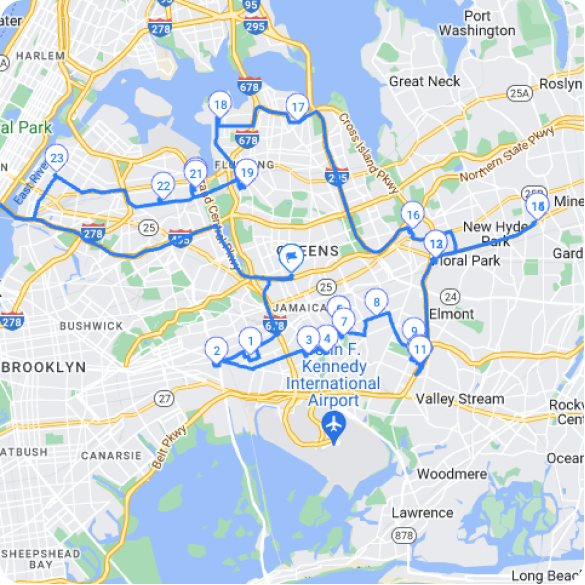
Traditional scheduling assigns jobs chronologically rather than geographically. A technician might drive from downtown to the suburbs for a morning appointment, then back downtown for lunch, then to another suburb in the afternoon.
This zigzag pattern can add 2-3 hours of drive time per technician per day. According to the Bureau of Statistics Statistics, field service technicians spend an average of 25% of their workday traveling between jobs.
Reactive Scheduling Instead of Strategic Coordination
Many companies schedule installations as orders come in, without considering crew locations or capacity. This reactive approach creates scheduling conflicts, forces rushed installations, and leaves crews with uneven workloads.
Some technicians end up with 8 jobs in one day while others have just 3. This imbalance reduces overall team productivity and creates service quality issues.
Limited Communication Between Office and Field Teams
Poor communication systems force technicians to call the office for updates, customer information, or schedule changes. These interruptions break workflow and add 10-15 minutes per incident.
Field teams also struggle to provide real-time updates on job completion, making it difficult for schedulers to optimize routes throughout the day.
Customer Availability Issues and Last-Minute Changes
Installation appointments require customer presence, but poor coordination leads to no-shows, reschedules, and extended waiting periods. These disruptions can derail an entire day’s schedule.
Without proper customer communication systems, technicians often arrive to find customers unavailable or unprepared for the installation.
Optimizing Crew Routes and Scheduling for Maximum Daily Installations
Strategic route optimization transforms cable installation operations from reactive to proactive. The right approach can reduce daily travel time by 40% while increasing job completion rates.
Geographic Clustering Reduces Drive Time Between Jobs
Group installations by geographic area rather than scheduling chronologically. Assign each crew to a specific territory for the day, minimizing travel time between appointments.
For example, assign all morning appointments in the north zone to Crew A, while Crew B handles the south zone. This approach can cut daily drive time from 3 hours to 90 minutes per technician.
Consider customer density when creating clusters. Urban areas allow tighter scheduling with 15-30 minute gaps between jobs, while suburban routes need 45-60 minute windows to account for longer distances.
Time Window Optimization Prevents Schedule Conflicts
Use time windows strategically to maximize daily capacity. Offer customers 2-hour appointment windows rather than specific times, giving crews flexibility to optimize their routes.
Schedule complex installations (whole-home setups, business installations) during longer morning windows when teams have more energy and time. Reserve afternoon slots for quicker residential jobs like cable box additions.
Build buffer time into schedules for unexpected delays. A 15-minute buffer between appointments prevents one delayed job from derailing the entire day’s schedule.
Skill-Based Assignment Improves Installation Speed
Match technicians to jobs based on their specific skills and experience levels. Senior technicians should handle complex commercial installations, while newer team members focus on standard residential jobs.
This specialization approach reduces installation time by 20-30% compared to random assignment. Experienced technicians complete complex jobs faster, while newer technicians aren’t overwhelmed by difficult installations.
Create teams that combine different skill levels for training purposes, but ensure the lead technician has appropriate experience for the job complexity.
Dynamic Route Adjustments Handle Real-Time Changes
Build flexibility into daily schedules to handle cancellations, emergency calls, and schedule changes. When one appointment cancels, immediately reassign the crew to fill gaps in other routes.
Zeo Route Planner solves this with dynamic route optimization that automatically adjusts crew schedules when changes occur. The AI-powered routing saves 2+ hours daily per driver by continuously optimizing routes throughout the day.
Monitor crew progress throughout the day and make real-time adjustments. If one crew finishes early, they can take overflow jobs from teams running behind schedule.
Digital Tools and Mobile Apps That Streamline Field Operations
Modern cable installation operations rely on digital coordination between office staff and field crews. The right technology stack eliminates communication delays and automates routine tasks.
Route Optimization Software Eliminates Manual Planning
Manual route planning takes schedulers 30-45 minutes per crew per day. Lozisialy fanatsarana ny lalana reduces this to 5 minutes while creating more efficient routes.
Advanced platforms consider multiple factors simultaneously: crew locations, job complexity, customer time windows, and traffic patterns. This comprehensive optimization isn’t possible with manual planning.
Operations managers use Zeo’s web platform to plan optimized routes for multiple crews, while technicians receive their daily routes directly on the Zeo mobile app with turn-by-turn navigation and customer contact information.
The platform handles capacity-based routing for crews with different skill levels and assigns priority jobs (like service restoration) ahead of standard installations.
Mobile Apps Provide Real-Time Job Information
Field technicians need instant access to customer information, installation requirements, and route updates. Mobile apps eliminate the need to call the office for basic information.
Effective apps include customer contact details, installation specifications, previous service history, and any special requirements (like gate codes or pet warnings). This information helps technicians prepare properly and complete jobs more efficiently.
Real-time updates allow office staff to communicate schedule changes, priority jobs, or customer requests directly to field crews without interrupting their current installation.
Digital Proof of Service Reduces Administrative Time
Paper-based completion forms create administrative overhead and delay job closure. Digital proof of service systems capture photos, signatures, and notes directly in the field.
Technicians can document completed installations, capture customer signatures, and upload photos of equipment placement immediately after job completion. This documentation automatically syncs with office systems.
Zeo’s proof of service features include photo capture, digital signature collection, and detailed delivery notes, enabling technicians to close jobs completely in the field.
GPS Tracking Improves Coordination and Accountability
Live GPS tracking helps dispatchers understand crew locations and estimated completion times. This visibility enables better coordination and more accurate customer communication.
Fanaraha-maso fiara amin'ny fotoana tena izy also provides objective data on drive times, job duration, and route efficiency. Use this information to identify training opportunities and recognize high-performing technicians.
Real-time location data helps with emergency dispatching and allows managers to send the closest available crew to urgent service calls.
Real-Time Communication Systems to Eliminate Installation Delays
Effective communication between office staff, field crews, and customers prevents most installation delays. Modern communication systems automate routine updates and streamline urgent coordination.
Automated Customer Notifications Reduce No-Shows
Send automated appointment confirmations 24 hours before installation, including technician contact information and arrival window. Follow up with a reminder 2 hours before the appointment.
Include clear instructions about what customers need to prepare: clearing access areas, having account information ready, and ensuring someone over 18 is present for installation.
Provide customers with live tracking links so they can see their technician’s location and estimated arrival time. This transparency reduces anxiety and prevents unnecessary phone calls to your office.
In-App Communication Eliminates Phone Tag
Direct messaging between dispatchers and field crews eliminates phone tag and reduces interruptions. Software fanaraha-maso mpamily enables technicians to request information or report issues without stopping their current installation.
Use structured communication templates for common situations: parts needed, schedule changes, customer issues, or emergency calls. This standardization speeds up communication and reduces misunderstandings.
Enable crews to send photos and notes through the messaging system for technical support or documentation purposes.
Live ETA Updates Keep Customers Informed
Provide customers with real-time arrival estimates that update automatically based on crew location and progress. This eliminates “where is my technician” phone calls and improves customer satisfaction.
Zeo Route Planner provides live ETA updates for customers through SMS, email, and a branded tracking page with your company logo, reducing customer service calls by up to 60%.

mampitombo ny fitsitsiana solika
Mitahiry 200 dolara amin'ny solika, isam-bolana!
Amboary ny lalana miaraka amin'ny algorithm, mampihena ny fotoana sy ny fandaniana amin'ny fomba mahomby.
Get Started for Free
Automatically notify customers when crews are running late due to previous job delays. Offer rescheduling options immediately rather than forcing customers to wait.
Priority Communication Channels for Urgent Issues
Establish clear communication protocols for emergency situations, service outages, or priority customers. These urgent issues need immediate attention without disrupting routine operations.
Create escalation procedures that bypass normal communication channels for time-sensitive situations. This might include direct phone lines, priority messaging flags, or automated alerts.
Train technicians to recognize situations that require immediate communication: customer complaints, safety issues, equipment problems, or potential service disruptions.
Customer Coordination Strategies to Prevent No-Shows and Reschedules
Customer coordination problems cause more installation delays than technical issues. Proactive customer management reduces no-shows by 40% and improves first-visit completion rates.
Pre-Installation Preparation Reduces Job Complexity
Contact customers 48 hours before installation to confirm appointment details and explain preparation requirements. This call identifies potential issues before crews arrive on-site.
Verify access requirements: parking availability, apartment building access codes, homeowner association restrictions, or special entry procedures. Address these issues in advance rather than discovering them during installation.
Confirm technical requirements and existing equipment. If customers need equipment upgrades or have compatibility issues, resolve these before scheduling installation appointments.
Flexible Scheduling Options Reduce Conflicts
Offer multiple appointment options to accommodate customer schedules. Provide morning, afternoon, and evening windows rather than rigid time slots.
Consider offering premium scheduling options for customers willing to pay extra: guaranteed 2-hour windows, specific time requests, or same-day installation for urgent needs.
Build makeup capacity into weekly schedules to handle reschedules without extending wait times. Reserve 10-15% of crew capacity for rescheduled appointments and emergency calls.
Clear Communication About Installation Process
Explain the installation process clearly during initial scheduling. Customers who understand what to expect are more likely to be prepared and available.
Provide realistic time estimates for different installation types. A whole-home cable installation takes 2-4 hours, while adding a cable box to existing service takes 30-60 minutes.
Address common customer concerns proactively: wall drilling requirements, furniture moving, cleanup procedures, and testing processes. Clear expectations prevent surprises and delays.
Confirmation and Reminder Systems
Implement multiple confirmation touchpoints: initial appointment confirmation, 24-hour reminder, and 2-hour arrival notice. Each touchpoint should include different information to maximize effectiveness.
Use multiple communication channels: phone calls for complex installations, text messages for standard appointments, and email for detailed information and documentation.
Include technician contact information in final confirmations so customers can communicate directly if issues arise.
Measuring and Continuously Improving Installation Efficiency
Data-driven optimization separates high-performing cable installation operations from those struggling with efficiency issues. Track key metrics consistently and use insights to drive continuous improvement.
Key Performance Indicators for Installation Efficiency
Monitor jobs completed per technician per day as your primary efficiency metric. Track this by crew, installation type, and geographic area to identify patterns and improvement opportunities.
Measure average drive time between installations and total daily travel time per crew. These metrics directly impact your ability to complete more jobs per day.
Track first-visit completion rates to identify training needs or process improvements. Low completion rates indicate preparation issues, parts availability problems, or skill gaps.
Route Optimization Metrics
Analyze route efficiency by comparing planned versus actual drive times. Consistent variances indicate routing problems or unrealistic scheduling assumptions.
Monitor the number of schedule changes per day and their impact on overall efficiency. Frequent changes suggest planning issues or poor customer coordination.
Track crew overtime hours and their correlation with route efficiency. Well-optimized routes should reduce overtime while maintaining service quality.
Customer Satisfaction and Operational Impact
Measure customer satisfaction scores specifically related to appointment scheduling and technician arrival times. These scores directly correlate with operational efficiency.
Track the number of customer service calls related to scheduling issues, technician delays, or appointment confusion. Reducing these calls indicates improved coordination.
Monitor technician satisfaction and retention rates. Efficient operations with good tools and clear communication typically have lower turnover and higher job satisfaction.
Famakafakana ny fahombiazan'ny teknolojia
Evaluate the time saved through route optimization software compared to manual planning. Zeo Route Planner users typically save 2+ hours daily per driver while completing 20-30% more jobs per day.
Analyze mobile app usage and adoption rates among field crews. Low adoption indicates training needs or feature gaps that prevent full efficiency gains.
Track the accuracy of estimated completion times and arrival predictions. Improved accuracy reduces customer service issues and enables better scheduling.
Fizotry ny fanatsarana mitohy
Conduct monthly efficiency reviews with crew supervisors and experienced technicians. Fitantanana ny fanompoana eny an-kianja teams often identify practical improvements that management overlooks.
Test route optimization changes on a small scale before company-wide implementation. Compare performance metrics between test groups and control groups to validate improvements.
Regular training updates help crews adapt to new processes and technology. Efficiency improvements require both better tools and updated skills.
Araka ny FCC broadband deployment guidelines, efficient installation processes are crucial for meeting national connectivity goals. Companies implementing ny fomba fitantanana ny mpamily strategies alongside route optimization see the greatest improvements.
FAQ - Fanontaniana Fametraky ny Olona Matetika
Q: What’s the average number of cable installations a technician can complete per day?
The average cable technician completes 4-6 installations per day, though this varies significantly based on route efficiency and job complexity. Companies using optimized routing typically see 20-30% increases in daily job completion rates.
Q: How much time do cable technicians spend driving between jobs?
According to Bureau of Labor Statistics data, field service technicians spend approximately 25% of their workday traveling between jobs. Poor route planning can increase this to 3+ hours of daily drive time per technician.
Q: What’s the biggest cause of cable installation delays?
Poor route planning and scheduling coordination cause most installation delays, not technical complexity. Zeo Route Planner’s AI-powered optimization addresses this by reducing daily travel time by 2+ hours while enabling dynamic route adjustments for real-time changes.
Q: How can cable companies reduce customer no-shows for installations?
Implementing automated appointment confirmations, 24-hour reminders, and live tracking links reduces no-shows by up to 40%. Clear communication about preparation requirements and realistic time estimates also improves customer availability.
Q: What tools help cable installation companies track crew productivity?
Route optimization platforms with GPS tracking provide visibility into crew locations, job duration, and route efficiency. Zeo’s real-time tracking and analytics help managers identify training opportunities and optimize daily schedules for maximum productivity.
-
Cable installation efficiency directly impacts your bottom line through higher daily job completion rates and reduced labor costs. Companies implementing comprehensive route optimization and digital coordination typically see 30% improvements in daily productivity within 60 days.
Start your free trial of Zeo Route Planner to optimize your cable installation routes and reduce travel time between jobs. Experience firsthand how AI-powered routing and real-time coordination can transform your installation operations.

Tompon'ny sambo ve ianao?
Te hitantana mora foana ny mpamily sy ny fanaterana anao?
Ampitomboy moramora ny orinasanao miaraka amin'ny Zeo Routes Planner - amboary tsara ny lalana ary mitantana mpamily maro mora foana.

mampitombo ny fitsitsiana solika
Livraison tsy misy manahirana sy alaina!
Amboary ny lalana miaraka amin'ny algorithm, mampihena ny fotoana sy ny fandaniana amin'ny fomba mahomby.
Get Started for Free