# Best Route Planner App 2026: Complete Business Guide
> TL; DR: Professional route planner apps reduce operational costs by 15-25% and save 2+ hours daily compared to manual planning methods. Advanced AI algorithms optimize multiple variables simultaneously—traffic, time windows, driver skills, and vehicle capacity—while basic tools only consider distance. Zeo Route Planner addresses these challenges with real-time optimization and automated customer communication, helping businesses across 150+ countries streamline their route operations.
Scegliere app per la pianificazione del percorso can make or break your growing business operations. What works for a single delivery driver falls apart when you’re managing 10+ routes daily.
Most businesses start with basic tools like Google Maps or simple routing apps. These work fine initially, but they create operational bottlenecks as you scale. The difference between a basic route planner app and a business-grade solution becomes critical when you’re coordinating multiple drivers, managing customer expectations, and tracking service delivery.
This guide breaks down everything you need to evaluate when choosing a route planner app that grows with your business.
Why Your Current Route Planning Method Fails at Scale (And When to Upgrade)
I costi nascosti della pianificazione manuale del percorso
Manual route planning seems free until you calculate the real costs. According to the Istituto americano di ricerca sui trasporti, poor routing increases operational costs by 15-25% through wasted fuel, overtime labor, and missed service windows.
Here’s what breaks first when you outgrow basic methods:
Time Management Collapse: Planning routes for 5+ drivers takes 2-3 hours each morning. Your operations manager spends more time on spreadsheets than managing actual operations.
Customer Communication Gaps: Without automated notifications, customers constantly call asking “Where’s my delivery?” Your office becomes a call center instead of focusing on growth.
Nessuna visibilità in tempo reale: When routes go off-plan (traffic, vehicle breakdown, urgent additions), you’re flying blind. Problems compound throughout the day.
Clear Upgrade Signals
Hai bisogno di un professionista routing software for small business quando:
- Route planning takes more than 30 minutes daily
- Drivers regularly work overtime due to inefficient routes
- You’re adding/removing stops throughout the day
- Customer complaints about missed time windows increase
- You need proof of delivery for insurance or compliance
Small HVAC companies hit this wall around 4-5 technicians. Delivery services feel the pain at 3-4 drivers. The exact number varies, but the symptoms are universal.
Route Optimization Algorithm Comparison: How Different Apps Actually Calculate Routes
Algorithm Quality Determines Real-World Results
Non tutti algoritmi di ottimizzazione del percorso are equal. The difference between basic and advanced algorithms can save 20-30% on drive time and fuel costs.
Basic Algorithms (Free Apps): Use simple distance calculations. They find the shortest path between points but ignore real-world factors like traffic patterns, time windows, and vehicle constraints.
Algoritmi IA avanzati: Consider dozens of variables simultaneously – historical traffic data, time windows, driver skills, vehicle capacity, and priority stops. They continuously learn from actual route performance.
Key Algorithm Features to Evaluate
Dynamic Re-optimization: Can the app recalculate routes when you add urgent stops mid-day? Basic apps require manual replanning. Advanced systems like Zeo Route Planner automatically adjust remaining stops when priorities change, maintaining optimization throughout the shift.
Gestione dei vincoli: Does the algorithm respect time windows, driver skills, and vehicle limits? A route planner app that schedules a 2-hour HVAC repair in a 1-hour window creates customer service disasters.
Pianificazione di più giorni: For recurring routes or scheduled maintenance, can the system balance workloads across multiple days? This prevents driver burnout and ensures consistent service levels.
Testing Algorithm Quality
Request a demo with your actual addresses. Compare the suggested routes against your current best routes. Quality algorithms should show immediate improvements in total drive time and logical stop sequences.
Essential Mobile Features That Separate Basic Apps from Business-Grade Solutions
The Mobile Experience Determines Driver Adoption
Your route planner app lives or dies based on driver acceptance. Clunky mobile interfaces create resistance and workarounds that eliminate optimization benefits.
Critical Mobile Functionality
Funzionalità offline: Routes must work without cellular connection. Drivers shouldn’t lose navigation in rural areas or underground parking garages.
Raccolta della prova di servizio: Photo capture, digital signatures, and delivery notes protect your business legally. These features also improve customer confidence and reduce payment disputes.
Comunicazione in tempo reale: Drivers need instant communication with dispatch. In-app chat prevents the phone tag that wastes time and creates confusion.
Fleet Coordination Features
This is where the fleet management angle becomes crucial. While drivers use the mobile app for navigation and service documentation, managers need web-based dashboards for route planning and oversight.
Fleet managers use the web platform to plan routes considering driver skills, vehicle capacity, and customer time windows. Drivers receive these optimized routes directly on their phones through the mobile app, complete with turn-by-turn navigation and customer details.
Live Tracking and ETAs: Software per il monitoraggio dei conducenti enables managers to monitor all vehicles in real-time while customers receive automatic ETA updates. This reduces customer service calls by 60-70% according to Bureau of Labor Statistics logistics industry reports.
Aggiornamenti dinamici: When priority changes occur, managers update routes on the web platform. Changes sync instantly to driver mobile apps without disrupting navigation.
Customer-Facing Mobile Features
Pagine di monitoraggio del marchio: Customers access live tracking through your company-branded page, not a generic app interface. This maintains your professional image throughout the service experience.
Notifiche automatizzate: SMS and email updates keep customers informed without manual intervention from your team.
Industry-Specific Route Planning: Which Apps Work Best for Your Business Type
Delivery Services Requirements
Delivery operations need high-volume stop optimization with proof of delivery features. Time windows matter more than service duration.
Consegna del pacco: Focus on apps with capacity constraints (weight/volume limits) and bulk address import from e-commerce platforms. Integration with Shopify or WooCommerce automates order processing.
Consegna del cibo: Prioritize apps with tight time windows and temperature-sensitive routing. Look for features that group orders by preparation time and delivery zones.
Field Services Considerations
Field service route management companies optimize for technician skills, service duration, and equipment requirements rather than pure stop volume.
HVAC/Idraulica: Apps need skill-based assignment (residential vs commercial expertise) and accurate time estimates for different job types. Emergency call insertion becomes critical.
Pest Control/Landscaping: Recurring route planning and seasonal scheduling matter more than day-to-day optimization. Look for apps that handle monthly/quarterly service cycles.
Universal Business Needs
Regardless of industry, your route planner app must handle:

aumentare il risparmio di carburante
Risparmia $ 200 sul carburante, mensilmente!
Ottimizza i percorsi con il nostro algoritmo, riducendo i tempi e i costi di viaggio in modo efficiente.
Inizia gratuitamente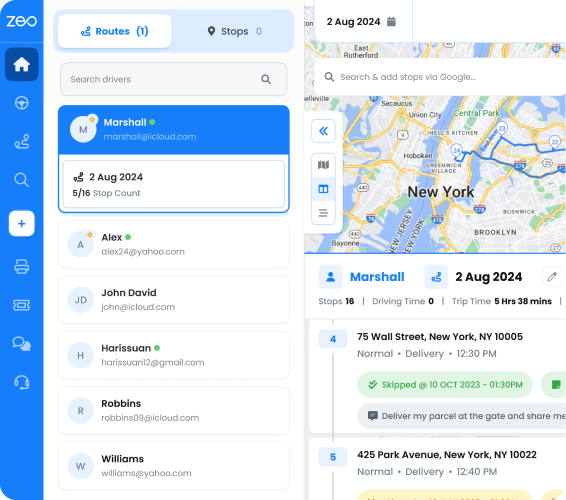
- Multiple vehicle types and capacities
- Driver work hour limits and break times
- Priority stop designation (ASAP vs normal)
- Analisi delle prestazioni storiche
Zeo Route Planner addresses these universal needs while serving 1.5M+ users across 150+ countries in both delivery and field service sectors, with AI-powered optimization that saves 2+ hours daily per driver.
Total Cost of Ownership Analysis: Free vs Paid Route Planner Hidden Costs
The Real Cost of “Free” Route Planning Apps
Free route planner apps cost more than paid solutions when you factor in hidden expenses and opportunity costs.
Confronto diretto dei costi
Free App Hidden Costs:
- Manager time: 2+ hours daily planning routes ($25/hour = $12,000+ annually)
- Excess fuel from suboptimal routes: 15-20% increase
- Driver overtime from poor routing: $3,000-8,000 per driver annually
- Lost customers from missed time windows: Impossible to quantify but significant
Paid App Investment:
- Monthly subscription: $20-50 per driver
- Implementation time: 2-4 hours
- Training time: 1-2 hours per driver
Analisi del pareggio
For a 5-driver operation, professional route planning typically pays for itself within 30-60 days through:
- Reduced planning time (saves 10+ hours weekly)
- Fuel savings (10-15% reduction)
- Improved on-time performance (fewer customer complaints)
The math becomes overwhelming positive as you scale beyond 8-10 drivers.
Quadro di calcolo del ROI
Calculate your potential savings:
- Risparmio di tempo: Current planning hours × hourly rate × 250 working days
- Risparmio di carburante: Annual fuel cost × 15% efficiency improvement
- Riduzione degli straordinari: Driver overtime hours × overtime rate
- Fidelizzazione dei clienti: Estimate revenue from improved service quality
Compare this total against annual app subscription costs. Most businesses see 300-500% ROI in the first year.
Integration Ecosystem: How Route Planners Connect with Your Existing Business Tools
Integration Strategy Determines Long-Term Success
Your route planner app shouldn’t exist in isolation. It needs to connect with your existing business systems to eliminate double data entry and ensure accurate information flow.
Integrazioni essenziali
Sistemi CRM: Customer information, service history, and special requirements should flow automatically from your CRM to route planning. HubSpot integration eliminates manual address entry and ensures drivers have complete customer context.
Piattaforme e-commerce: For delivery businesses, direct integration with Shopify, WooCommerce, or similar platforms automates order import and customer communication.
Software di contabilità: Route data should feed into invoicing and expense tracking systems. Mileage tracking for tax purposes and service completion for billing automation save significant administrative time.
Funzionalità di integrazione avanzate
Zapier Connectivity: Connects your route planner app with 1000+ business applications. Create custom workflows like automatically creating routes from new CRM opportunities or sending route completion data to project management tools.
Accesso API: For businesses with custom systems, API integration enables seamless data flow between route planning and proprietary business applications.
Ottimizzazione del flusso di dati
Effective integrations create circular data flow:
- Customer orders/service requests enter through your normal channels
- Route planner app receives and optimizes these into efficient routes
- Drivers complete services with proof of delivery
- Completion data flows back to billing, CRM, and customer communication systems
This eliminates manual data transfer and ensures consistent information across all business systems.
Calendario di attuazione
Plan for 2-4 weeks to fully implement integrations:
- Week 1: Basic app setup and driver training
- Week 2: Primary integration configuration (CRM or e-commerce)
- Week 3-4: Secondary integrations and workflow optimization
Zeo Route Planner streamlines this process with pre-built integrations for major business platforms and comprehensive API documentation for custom connections.
Making Your Route Planner App Decision
Quadro di valutazione
Test any software di pianificazione del percorso with these criteria:
- Algorithm Quality: Input 20+ real addresses and compare route efficiency
- Esperienza mobile: Have drivers test the interface during actual routes
- Capacità di integrazione: Verify connections with your existing systems
- Scalabilità: Ensure the app grows with planned business expansion
- Qualità del supporto: Test response times and expertise during trial period
Fattori di successo dell'implementazione
- Start with a small driver group (2-3) for initial rollout
- Maintain backup planning methods for the first week
- Gather daily feedback and adjust configurations
- Measure specific metrics (drive time, fuel usage, customer satisfaction)
The right route planner app transforms route planning from a daily operational burden into a competitive advantage. Focus on solutions that solve your current pain points while providing room for future growth.
Comprensione Regolamenti della Federal Motor Carrier Safety Administration ensures your chosen solution maintains compliance while improving efficiency.
Domande frequenti
Q: How much can a professional route planner app reduce daily drive time?
Professional route optimization typically reduces drive time by 15-25% compared to manual planning or basic GPS routing. Advanced AI algorithms like those in Zeo Route Planner can save 2+ hours daily per driver by considering traffic patterns, time windows, and vehicle constraints simultaneously.
Q: What’s the difference between free route planning and paid solutions?
Free route planners use basic distance calculations and lack real-time optimization, customer communication features, and business integrations. Professional solutions provide dynamic re-routing, proof of delivery, automated customer notifications, and connect with existing business systems to eliminate manual data entry.
Q: When should a growing business upgrade from basic route planning methods?
Upgrade when route planning takes more than 30 minutes daily, drivers regularly work overtime due to inefficient routes, or customer complaints about missed time windows increase. Most businesses hit this threshold around 3-5 drivers depending on service complexity.
Q: Can route planning apps integrate with existing business software?
Yes, professional route planners integrate with CRM systems, e-commerce platforms, and accounting software through APIs or pre-built connectors. Zeo Route Planner offers integrations with Shopify, WooCommerce, HubSpot, and connects to 1000+ applications through Zapier for automated workflow management.
Q: What mobile features are essential for driver adoption of route planning apps?
Critical features include offline capability, proof of service collection (photos, signatures), real-time communication with dispatch, and intuitive navigation interfaces. Apps that are clunky or require constant internet connection create driver resistance that eliminates optimization benefits.
Ready to see how professional route planning impacts your operations? Start your free trial of Zeo Route Planner and see how it can transform your route planning in under 10 minutes.

Sei proprietario di una flotta?
Vuoi gestire facilmente i tuoi autisti e le tue consegne?
Fai crescere la tua attività senza sforzi con Zeo Routes Planner: ottimizza i percorsi e gestisci più conducenti con facilità.
aumentare il risparmio di carburante
Risparmia $ 200 sul carburante, mensilmente!
Ottimizza i percorsi con il nostro algoritmo, riducendo i tempi e i costi di viaggio in modo efficiente.
Inizia gratuitamente