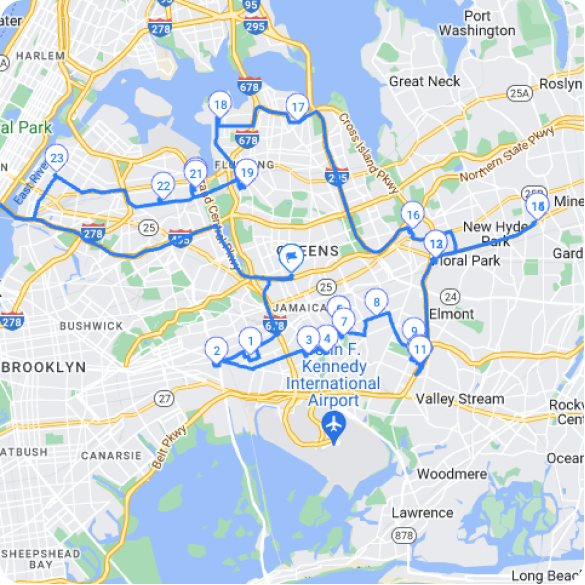
TL; DR: Ein Routenplaner für Sanitärbetriebe wandelt chaotische Einsatzpläne in organisierte, profitable Routen um, die die Fahrzeit um 20–30 % reduzieren und gleichzeitig die Kundenzufriedenheit steigern. Intelligente Routenoptimierung bewältigt die tägliche Herausforderung, Notfalleinsätze und planmäßige Wartungsarbeiten in verschiedenen Einsatzgebieten in Einklang zu bringen. Tools zur Optimierung mehrerer Stopps, wie der Zeo Routenplaner, helfen bei der Verwaltung komplexer Einsatzpläne, indem sie die Stoppreihenfolge bei Prioritätsänderungen automatisch anpassen.
Ein Klempnerbetrieb zu führen bedeutet, täglich Notrufe, planmäßige Wartungsarbeiten und Ersatzteillieferungen im ganzen Stadtgebiet zu koordinieren. Ihre Techniker verbringen Stunden damit, zwischen den Einsätzen hin und her zu fahren, anstatt Rohre zu reparieren und Geld zu verdienen. Ein Routenplaner für Klempnerarbeiten verwandelt dieses Chaos in organisierte, profitable Arbeitsabläufe, die Ihnen mehr Gewinn bringen.
Manuelle Routenplanung kostet Sanitärbetriebe monatlich Tausende von Dollar durch unnötigen Kraftstoffverbrauch, Überstunden und verpasste Termine. Intelligente Routenoptimierung reduziert die Fahrzeit um 20–30 % und sorgt gleichzeitig für zufriedene Kunden durch pünktliche Ankunftszeiten.
Warum die manuelle Routenplanung Ihrem Sanitärbetrieb Geld kostet
Ihr Disponent schaut auf eine Karte, plant fünf Serviceeinsätze ein und schickt Mike zuerst in den Norden. Drei Stunden später steht Mike im Stau zurück in den Süden zu einer Notfallreparatur, die er hätte zuerst erledigen können. Währenddessen wartet Ihr Kunde zu Hause und nimmt sich dafür Urlaub.
Dieses Szenario tritt in Sanitärbetrieben mit manueller Terminplanung dutzende Male pro Woche auf. Laut US-VerkehrsministeriumNutzfahrzeuge verschwenden 25 % ihres Kraftstoffs aufgrund ineffizienter Routenplanung und Verkehrsverzögerungen.
Manuelle Planung verursacht diverse kostspielige Probleme. Techniker fahren zwischen den Einsätzen 30–40 % mehr Kilometer als nötig. Durch mangelhafte Routenplanung kommt es zu Verspätungen, die Überstunden nach sich ziehen. Kunden verschieben Termine, wenn die Techniker außerhalb der vereinbarten Zeitfenster eintreffen.
Notrufe bringen den gesamten Tagesablauf durcheinander. Ihre Disponenten versuchen verzweifelt, Aufträge neu zuzuweisen, was zu noch längeren Fahrzeiten und Verzögerungen führt. Software zur Fahrerverfolgung Dies wird unerlässlich, wenn mehrere Techniker in verschiedenen Stadtteilen im Einsatz sind. Es kommt zu Verwechslungen bei der Teilelieferung, wenn mehrere Techniker in denselben Stadtteilen unterwegs sind.
Stellen Sie sich einen typischen Dienstagmorgen vor: Sie haben acht Serviceeinsätze in Ihrem Einsatzgebiet. Bei manueller Planung würde Ihr Techniker möglicherweise von der Innenstadt in die Vororte, wieder zurück in die Innenstadt und dann erneut in die Vororte fahren. Intelligente Routenplanung hingegen hält ihn in einem Gebiet, bevor er zum nächsten fährt, wodurch sich Fahrstrecke und Zeit halbieren.
Die wahren Kosten beschränken sich nicht nur auf den Kraftstoffverbrauch. Produktivitätsverluste bedeuten weniger abgeschlossene Aufträge pro Tag. Verspätete Termine führen zu Stornierungen und unzufriedenen Kunden, die sich beim nächsten Mal an die Konkurrenz wenden.
Wichtige Funktionen, die jeder Routenplaner für Sanitärinstallationen haben sollte
Effektive Routenplanungssoftware benötigt spezifische Funktionen, die auf die Abläufe in Sanitärbetrieben zugeschnitten sind. Einfache Karten-Apps reichen für die Komplexität von Serviceeinsätzen, Notfalleinsätzen und den Spezialisierungen der Techniker nicht aus.
Die Echtzeit-Routenoptimierung passt die Fahrpläne automatisch an, sobald neue Notrufe eingehen. Ihre Software berechnet umgehend die optimale Reihenfolge für alle verbleibenden Haltestellen neu, um Störungen bestehender Termine zu minimieren.
Die Routenplanung für mehrere Fahrzeuge verwaltet Ihre gesamte Fahrzeugflotte gleichzeitig. Das System berücksichtigt bei der Auftragsvergabe den Standort, die Qualifikationen und die verfügbaren Zeitfenster jedes Technikers. So wird beispielsweise verhindert, dass ein Warmwasserbereiter-Einbau einem Techniker zugewiesen wird, der nicht über die notwendige Ausrüstung verfügt.
Mit der Zeitfensterverwaltung können Sie Ihren Kunden konkrete Ankunftszeiten zusichern. Die Software berücksichtigt die Auftragsdauer, die Fahrzeit und Pufferzeiten, um realistische Zeitpläne zu erstellen, die Ihre Techniker auch einhalten können.
Die kompetenzbasierte Auftragsvergabe ordnet Aufträge automatisch qualifizierten Technikern zu. Ihr Abflussreinigungsspezialist kümmert sich um Abwasserleitungen, während Ihr Warmwasserbereiter-Experte Installationen durchführt. Das verbessert die Auftragsabwicklung und reduziert Nachbesserungen.
Dank mobilem Zugriff bleiben die Techniker den ganzen Tag über auf dem Laufenden. Routenänderungen, neue Adressen und Kundeninformationen werden sofort mit ihren Smartphones synchronisiert. Sie erhalten optimierte Wegbeschreibungen zu jedem Einsatzort, ohne die Leitstelle anrufen zu müssen.
Zeo Route Planner erfüllt diese Anforderungen durch eine Optimierung mehrerer Stopps, die komplexe Sanitärpläne über verschiedene Servicegebiete hinweg berücksichtigt. Die Plattform wird von über 2 Millionen Nutzern bedient, die für ihre Außendiensttätigkeiten eine zuverlässige Routenplanung benötigen.
Die Integration der Servicehistorie zeigt frühere Besuche, durchgeführte Arbeiten und Kundenpräferenzen an jedem Standort an. Ihr Techniker weiß, dass Frau Johnsons Warmwasserbereiter vor sechs Monaten gewartet wurde und sie Termine am Nachmittag bevorzugt.
Wie Sie Ihren Tagesablauf für Notfall- und geplante Anrufe optimieren können
Die Balance zwischen Notfalleinsätzen im Sanitärbereich und planmäßigen Wartungsarbeiten erfordert eine strategische Planung, die den meisten Disponenten manuell schwerfällt. Eine intelligente Einsatzplanung sichert die Einnahmen aus beiden Servicearten, ohne die Kunden zu enttäuschen.
Planen Sie in Ihrem ersten Terminplan 20–30 % Ihrer täglichen Kapazität für Notfalleinsätze ein. Dieser Puffer verhindert, dass Notfalleinsätze geplante Termine vollständig beeinträchtigen. Blockieren Sie diese Zeitfenster während der Hauptnotfallzeiten – in der Regel am späten Vormittag und frühen Nachmittag.
Erstellen Sie geografische Zonen, um Techniker zu bestimmten Zeiten in bestimmten Gebieten einzusetzen. Planen Sie alle Termine im Norden vormittags und verlagern Sie die Einsätze im Süden nach dem Mittagessen. Dadurch werden die Anfahrtszeiten bei Notrufen verkürzt. Ähnlich wie bei anderen Fachleuten. Reduzierung der Anfahrtszeit des ElektrikersSanitärbetriebe profitieren von strategischem Gebietsmanagement.
Nutzen Sie Prioritätsstufen, um die Einsatzplanung zu steuern. Notfallreparaturen haben höchste Priorität, gefolgt von Serviceeinsätzen am selben Tag und anschließend routinemäßigen Wartungsarbeiten. Ihre Routenplanungssoftware sollte automatisch den am besten geeigneten Techniker basierend auf Standort und aktueller Auslastung vorschlagen.
Erstellen Sie realistische Zeitschätzungen für gängige Sanitärarbeiten. Eine einfache Wasserhahnreparatur dauert inklusive Anfahrt und Papierkram etwa 45 Minuten. Der Austausch eines Warmwasserbereiters benötigt 3–4 Stunden. Genaue Schätzungen verhindern Zeitüberschreitungen, die sich über den gesamten Tag erstrecken können.
Wenn beispielsweise um 10 Uhr ein Notfall wegen eines Wasserrohrbruchs gemeldet wird, ermittelt Ihr System den nächstgelegenen verfügbaren Techniker und passt dessen restliche Tourenplanung an, um die Gesamtfahrzeit zu minimieren. Der Kunde erhält so schnellen Service, während andere Termine planmäßig eingehalten werden können.
Planen Sie vorbeugende Wartungsarbeiten in ruhigeren Zeiten ein, um Lücken zwischen Notfalleinsätzen zu füllen. Diese flexiblen Termine können bei dringenden Aufträgen verschoben werden, sodass die Techniker den ganzen Tag über produktiv bleiben. Software für die Notrufzentrale von Heizungs-, Lüftungs- und Klimaanlagen Die Prinzipien gelten gleichermaßen für das Notfallmanagement im Sanitärbereich.
Tools wie Zeo Route Planner ordnen Haltestellen automatisch neu an, wenn sich Prioritäten ändern, und sorgen so für effiziente Routen, selbst wenn Notrufe den ursprünglichen Fahrplan durcheinanderbringen.

Kraftstoffeinsparungen erhöhen
Sparen Sie monatlich 200 $ bei Kraftstoff!
Optimieren Sie Routen mit unserem Algorithmus und reduzieren Sie so effizient Reisezeit und -kosten.
Jetzt kostenlos starten
Reduzierung von Kraftstoffkosten und Fahrzeit durch intelligente Routenoptimierung
Laut einer Studie machen die Treibstoffkosten bei den meisten Sanitärbetrieben 15-20 % der Betriebskosten aus. Nationale Vereinigung der WohnungsbauerDurch eine schlechte Routenplanung wird ein Viertel dieser Kosten durch unnötige Kilometer und Verkehrsverzögerungen verschwendet.
Routenoptimierungsalgorithmen berechnen den kürzesten Weg zwischen mehreren Haltestellen und berücksichtigen dabei reale Faktoren wie Verkehrsaufkommen, Straßenbeschränkungen und Terminfenster. Dadurch verkürzt sich die gesamte Fahrzeit im Vergleich zur manuellen Planung um 25–35 %.
Die morgendliche Routenanalyse verhindert unnötige Umwege innerhalb Ihres Einsatzgebietes. Anstatt Techniker wahllos zwischen verschiedenen Stadtteilen hin und her zu schicken, sorgen optimierte Routen dafür, dass sie den ganzen Tag über in geografischen Clustern arbeiten. So kann ein Techniker beispielsweise drei Aufträge im selben Postleitzahlengebiet erledigen, bevor er zum nächsten Einsatzort weiterfährt.
Die dynamische Routenumleitung spart zusätzlichen Kraftstoff bei Planänderungen. Storniert oder verschiebt ein Kunde einen Termin, berechnet das System sofort die effizienteste Reihenfolge für die verbleibenden Stopps neu. Ihr Techniker fährt weder zu einem stornierten Termin noch einen Umweg zum nächsten Einsatzort.
Die Echtzeit-Verkehrsanalyse findet jederzeit die schnellste Route. Im Berufsverkehr kann die Autobahnfahrt bis zu 20 Minuten länger dauern als die Fahrt über Landstraßen. Ihre Routenplanungssoftware passt sich automatisch an, spart Kraftstoff und sorgt dafür, dass Termine eingehalten werden.
Vergleichen Sie dies: Die manuelle Routenplanung für acht tägliche Serviceeinsätze führt typischerweise zu einer Fahrstrecke von 120–150 Meilen. Optimierte Routenplanung ermöglicht die gleichen Einsätze in nur 85–100 Meilen. Bei den aktuellen Kraftstoffpreisen spart dies 15–25 US-Dollar pro Techniker und Tag bzw. 4,000–6,000 US-Dollar jährlich für einen Betrieb mit fünf Fahrzeugen.
Die Optimierung der Fahrzeugkapazität stellt sicher, dass die Techniker die richtigen Teile und Werkzeuge für ihre jeweiligen Routen mitführen. Dadurch werden Rückfahrten zur Werkstatt wegen vergessener Teile vermieden und unnötige Kilometer eingespart. Im Anschluss an eine umfassende Leitfaden zur Routenoptimierung hilft dabei, diese Kraftstoffeinsparungen zu maximieren.
Verbesserung der Kundenkommunikation und der Servicefenster
Genaue Ankunftszeiten heben professionelle Klempnerdienste von Mitbewerbern ab, die vage Schätzungen wie „irgendwann zwischen 8 und 5 Uhr“ abgeben. Kunden wünschen sich präzise Informationen, um ihren Tag um Ihren Servicebesuch herum planen zu können.
Die Routenoptimierung ermöglicht präzise Zeitfenster durch die Berechnung der tatsächlichen Fahrzeiten zwischen den Terminen. Anstatt Ankunftszeiten zu schätzen, liefern Sie datenbasierte Schätzungen, die die Auftragsdauer, die Fahrstrecke und die aktuelle Verkehrslage berücksichtigen.
Automatisierte Kundenbenachrichtigungen halten Ihre Kunden während des gesamten Servicetages auf dem Laufenden. Per SMS oder E-Mail erhalten Sie eine Information, sobald der Techniker den vorherigen Auftrag abgeschlossen hat, und eine aktualisierte Ankunftszeit. Diese Transparenz schafft Vertrauen und reduziert besorgte Anrufe in Ihrem Büro.
Die GPS-Ortung zeigt genau an, wo sich die Techniker befinden und wann sie zum nächsten Termin eintreffen. Die Disponenten können Kunden bei Verzögerungen proaktiv kontaktieren und ihnen die Möglichkeit bieten, den Termin zu verschieben oder auf den verspäteten Techniker zu warten.
Laut einer 2026-Studie der Forschungsstiftung für die DienstleistungsbrancheKunden, die genaue Ankunftszeitinformationen erhalten, bewerten den Service um 40 % höher als diejenigen, die nur allgemeine Zeitfenster erhalten.
Echtzeit-Updates ermöglichen einen professionellen Umgang mit unvermeidlichen Terminänderungen. Verspätet sich der Einsatz Ihres Technikers aufgrund eines Notfalls um eine Stunde, werden betroffene Kunden umgehend über die neue Ankunftszeit informiert. Viele schätzen diese Transparenz gegenüber unangekündigtem oder stark verspätetem Erscheinen.
Mobile Apps ermöglichen es Kunden, den Standort des Technikers und die voraussichtliche Ankunftszeit zu verfolgen, ähnlich wie bei Fahrdiensten. Diese Transparenz reduziert Unsicherheiten und verpasste Termine, wenn Kunden kurz außer Haus müssen.
Die Optimierung der Servicezeiten bringt Kundenwünsche und betriebliche Effizienz in Einklang. Frühaufsteher erhalten Termine am frühen Morgen, während Berufstätige Termine außerhalb der regulären Geschäftszeiten bekommen. Routenplanungssoftware berücksichtigt diese Präferenzen bei der täglichen Terminplanung.
Lösungen wie Zeo Route Planner bieten GPS-Tracking und automatisierte Benachrichtigungen, die Kunden während des gesamten Serviceprozesses auf dem Laufenden halten und so zur 4.8-Sterne-Bewertung der Plattform durch zufriedene Nutzer beitragen. Diese Kommunikationsfunktionen sind Teil eines umfassenderen Ansatzes. Kundenbindungsstrategien die erfolgreiche Dienstleistungsunternehmen umsetzen.
Mithilfe von Zwei-Wege-Kommunikationstools können Techniker den Auftragsstatus und die Fertigstellungszeiten direkt über ihre Mobilgeräte aktualisieren. Kunden erhalten sofortige Benachrichtigungen, sobald die Arbeiten abgeschlossen sind, was eine schnellere Zahlungsabwicklung und höhere Kundenzufriedenheitswerte ermöglicht.
Häufig gestellte Fragen
F: Um wie viel können Routenoptimierungen die Treibstoffkosten für Sanitärbetriebe senken?Durch Routenoptimierung lassen sich die Treibstoffkosten für Sanitärbetriebe typischerweise um 25–35 % senken, indem unnötige Kilometer vermieden und Umwege innerhalb des Einsatzgebietes verhindert werden. Bei den aktuellen Treibstoffpreisen entspricht dies einer jährlichen Ersparnis von 4,000–6,000 US-Dollar für einen Sanitärbetrieb mit fünf Fahrzeugen.
F: Wie kann man am besten mit Notrufen im Bereich Sanitärtechnik umgehen, ohne geplante Termine zu stören?Reservieren Sie 20–30 % Ihrer täglichen Kapazität für Notfalleinsätze und richten Sie geografische Zonen ein, in denen Techniker zu bestimmten Zeiten in bestimmten Gebieten eingesetzt werden. Dieses Puffersystem ermöglicht es, Notfalleinsätze durchzuführen und gleichzeitig geplante Termine mit minimalen Beeinträchtigungen aufrechtzuerhalten.
F: Wie können Klempnerbetriebe ihren Kunden genaue Ankunftszeiten mitteilen?Moderne Routenplaner für Sanitärarbeiten berechnen präzise Zeitfenster unter Berücksichtigung der tatsächlichen Fahrzeit, der Arbeitsdauer und der aktuellen Verkehrslage. Tools wie Zeo Route Planner bieten GPS-Tracking und automatische Benachrichtigungen, die Kunden während des gesamten Serviceprozesses auf dem Laufenden halten und so zu einer höheren Kundenzufriedenheit beitragen.
F: Auf welche Funktionen sollten Sanitärinstallateure bei der Auswahl einer Routenplanungssoftware achten?Zu den Kernfunktionen gehören die Echtzeit-Routenoptimierung für Notrufe, die qualifikationsbasierte Einsatzplanung zur Zuordnung von Aufträgen zu qualifizierten Technikern, die Verwaltung von Zeitfenstern für Kundentermine und der mobile Zugriff auf Aktualisierungen im Außendienst. Die Software sollte zudem mehrere Fahrzeuge gleichzeitig verwalten und Servicehistorien integrieren.
F: Wie wirkt sich eine mangelhafte Routenplanung auf die Rentabilität eines Klempnerbetriebs aus?Die manuelle Routenplanung kostet Sanitärbetriebe monatlich Tausende von Euro durch unnötigen Kraftstoffverbrauch, Überstunden und verpasste Termine. Techniker fahren oft 30–40 % mehr Kilometer als nötig, was zu weniger abgeschlossenen Aufträgen pro Tag und Stornierungen durch Kunden führt, da die Ankunftszeiten nicht zuverlässig eingehalten werden können.
Starten Sie noch heute Ihre kostenlose Testversion
Verschwenden Sie kein Geld mehr mit ineffizienten Routen, die Kraftstoff verbrauchen und Kunden verärgern. Moderne Routenplanungssoftware amortisiert sich bereits im ersten Monat durch kürzere Fahrzeiten und höhere Produktivität. Ihre Techniker erledigen mehr Aufträge, und Ihre Kunden profitieren von einem besseren Service dank präziser Ankunftszeiten. Starten Sie noch heute Ihre kostenlose Testphase und erleben Sie, wie die Routenoptimierung Ihre Abläufe im Sanitärbereich revolutioniert.

Sind Sie Flottenbesitzer?
Möchten Sie Ihre Fahrer und Lieferungen einfach verwalten?
Erweitern Sie Ihr Geschäft mühelos mit dem Zeo Routes Planner – optimieren Sie Routen und verwalten Sie problemlos mehrere Fahrer.

Kraftstoffeinsparungen erhöhen
Problemlose Lieferungen und Abholungen!
Optimieren Sie Routen mit unserem Algorithmus und reduzieren Sie so effizient Reisezeit und -kosten.
Jetzt kostenlos starten